
Download HttpFox – Free Firefox Add‑On for Monitoring HTTP Traffic
Overview of HttpFox
HttpFox is a lightweight yet powerful add‑on for the Mozilla Firefox browser that turns your web client into a real‑time HTTP traffic inspector. Designed for developers, QA engineers, and curious power users, HttpFox captures every request and response that Firefox sends or receives, presenting the data in an easy‑to‑read tabular format. Whether you are troubleshooting broken links, debugging AJAX calls, or simply learning how a web page is built, HttpFox gives you instant visibility into HTML, CSS, JavaScript, image, and other protocol traffic.
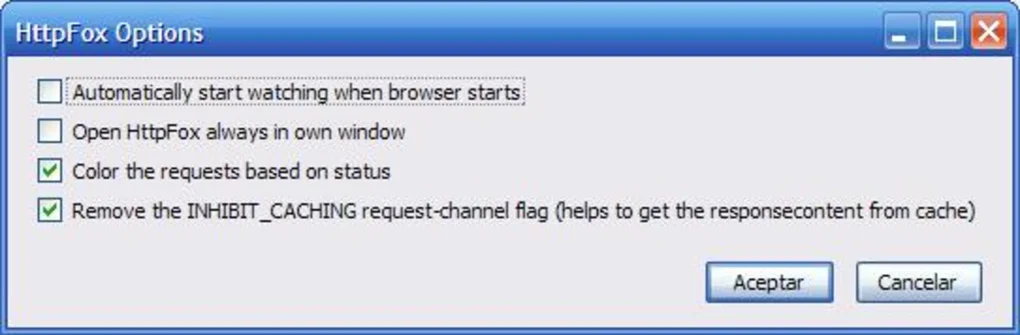
The tool displays full request and response headers, cookie values, POST parameters, and the raw content of each payload, allowing you to dissect the communication between your browser and the server without installing a separate proxy or network sniffer. Because it runs directly inside Firefox, HttpFox respects the same security sandbox as the browser, ensuring that the monitoring process remains secure and does not expose sensitive information to external applications. The add‑on can be set to launch automatically in its own tab each time Firefox starts, making it a seamless part of your development workflow.
Key Features of HttpFox
- Live HTTP Capture: Monitors inbound and outbound traffic in real time, updating the view as soon as a request is made.
- Protocol Categorization: Automatically groups traffic by type – HTML, CSS, JavaScript, images, XHR, and more – for quick filtering.
- Full Header Inspection: Shows request and response headers, allowing you to verify content‑type, cache directives, authentication tokens, and custom server headers.
- Cookie Management: Lists all cookies sent with each request and received from the server, making it easy to debug session handling.
- POST Data Viewer: Parses and displays POST parameters and multipart form data, useful for debugging form submissions and API calls.
- Content Preview: Offers a raw view of response bodies (HTML, JSON, XML, plain text) directly within the add‑on.
- Auto‑Launch on Startup: Configurable to open HttpFox in a dedicated tab each time Firefox launches, ensuring you never miss a request.
- Lightweight & Secure: Runs inside Firefox’s sandbox, consumes minimal memory, and does not require elevated permissions.
- Export Capability: Allows you to copy request details or export the entire session for offline analysis.
- Free & Open Source: Available at no cost, with regular updates from the community.
Installation, Usage Instructions & Compatibility
Step‑by‑Step Installation
Installing HttpFox is as simple as adding any other Firefox add‑on. Open Firefox, navigate to the official Mozilla Add‑Ons page, and search for “HttpFox”. Click the Add to Firefox button, confirm the permission dialog, and the add‑on will be downloaded and installed automatically. After the installation, a new tab named “HttpFox” appears in your tab bar. If you prefer a manual approach, you can download the XPI file from the project’s GitHub repository and drag it onto an open Firefox window; the browser will prompt you to confirm the installation.
Getting Started with the Tool
Once installed, click the HttpFox tab to open the interface. By default, the add‑on starts capturing traffic immediately. You can pause and resume capture using the toolbar button at the top of the panel.
To filter results, use the dropdown menu that lists protocol categories – selecting “JavaScript” will hide all non‑script requests, for example. Clicking on a specific row expands a detailed view where you can examine request headers, response headers, cookies, and the raw content. For POST requests, a separate sub‑panel shows the exact parameters sent to the server.
The “Export” button at the bottom lets you copy the selected request to the clipboard or download a JSON file containing the whole session.
Operating System Support
HttpFox is built as a Firefox extension, which means it inherits the cross‑platform compatibility of the Firefox browser itself. It works on Windows 10/11, macOS 10.15 (Catalina) and later, Linux distributions that support Firefox, as well as on Firefox for Android (limited UI). Because the add‑on runs inside the browser, there is no separate installer, and you do not need to worry about system‑level dependencies. The only requirement is a recent version of Firefox (v78 or newer) to ensure full API compatibility and security patches.
Best Practices for Secure Use
While HttpFox is secure by design, it is good practice to disable the add‑on when you are not actively debugging, especially on public or shared computers. This prevents accidental exposure of sensitive request data (such as authentication tokens) to anyone who might have access to the open browser session. Additionally, because the tool can view POST bodies, avoid using it on production sites that handle personal data unless you have explicit permission and are following GDPR or other privacy regulations.
Pros, Cons, Frequently Asked Questions & Expert Review
Pros
- Completely free and open source.
- Real‑time capture without needing an external proxy.
- Intuitive UI that integrates directly into Firefox.
- Detailed inspection of headers, cookies, and POST data.
- Low memory footprint and secure sandboxed execution.
Cons
- Only available for Firefox; no Chrome or Edge version.
- Limited UI on mobile Firefox; full feature set works best on desktop.
- Does not provide built‑in request editing or replay capabilities.
- Occasional performance slowdown on very high‑traffic pages.
Frequently Asked Questions
Is HttpFox safe to use on production sites?
Yes, HttpFox runs inside Firefox’s sandbox and does not transmit captured data to external servers. However, you should disable it when not needed to prevent accidental exposure of sensitive request details.
Can I filter traffic by domain or URL?
HttpFox includes a quick search bar that lets you type any domain or keyword. The list updates in real time, showing only matching requests.
Does HttpFox work on Firefox for Android?
A limited version of HttpFox is available for Firefox on Android. Core header inspection works, but the UI is simplified due to screen size constraints.
How do I export captured data for offline analysis?
Click the “Export” button at the bottom of the HttpFox panel. You can copy the selected request to the clipboard or download a JSON file containing the entire session.
Is there a way to replay captured requests?
HttpFox does not currently include a request‑replay feature. For that capability, consider pairing it with tools like Postman or RESTer.
Expert Review
HttpFox stands out as one of the most straightforward HTTP monitoring solutions for Firefox. Its real‑time capture, comprehensive header view, and zero‑cost model make it an essential addition for developers who need quick insight without leaving the browser. While the lack of a request‑editing feature limits advanced debugging scenarios, the add‑on’s simplicity and low overhead outweigh this drawback for most everyday use‑cases. Overall, HttpFox earns a solid rating for usability, security, and value.
Conclusion – Why You Should Download HttpFox Today
If you spend any amount of time developing, testing, or simply exploring the web, having instant visibility into HTTP traffic can dramatically reduce debugging time and improve your understanding of how modern sites communicate. HttpFox delivers that capability in a free, secure, and Firefox‑native package. Its real‑time capture, detailed header inspection, and protocol categorization give you the tools you need without the complexity of external proxies or network sniffers. Although it is limited to the Firefox ecosystem, the add‑on’s lightweight footprint and auto‑launch option make it a perfect companion for daily development workflows. Download HttpFox now, enable it on your next project, and experience the convenience of built‑in traffic analysis directly inside your browser.
Click here to download HttpFox for free and start monitoring HTTP traffic instantly.







